
openTessera
A video player for Linux and macOS. Double-click a film and watch it — or put a whole wall of them on every monitor you own.
This is v0.3, not 1.0. I use it every day on Linux, under both X11 and Wayland, and it has been tried on a couple of Macs. That's the whole test lab. It's being shared now to find out how it does everywhere else — other distributions, desktops, GPUs and Macs.
Expect rough edges. A report that says "works fine on my setup" is as useful as a bug report, and ideas are welcome too. GitHub issues or email, whichever you prefer.
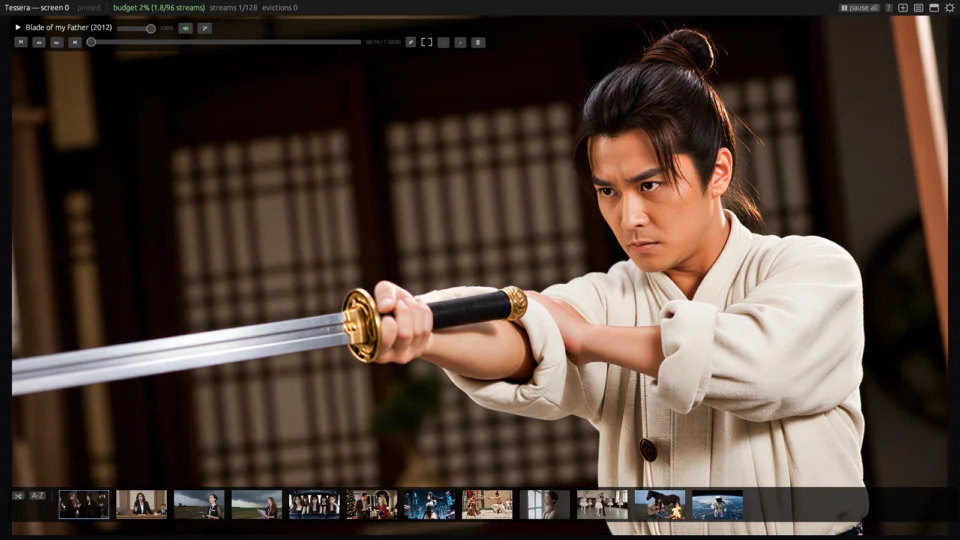
First, it's a video player
Most of the time you just want to watch something, and openTessera is happy to be that player. Double-click a video and it plays in an ordinary window, using the same engine as mpv — so it plays practically anything, decoded on your GPU.
- The usual controls. Click to pause, arrow keys to skip back and forward (hold to scan), the scroll wheel for volume, W for fullscreen.
- A queue you can see. Add films, episodes or whole folders from the library window and they line up behind what's playing. Move the mouse and they show as thumbnails along the bottom; N plays the next one. Reorder, shuffle or sort it in the queue tab.
- Your library, wherever it is. Local folders, Plex and Jellyfin, browsable in the library window — not just whatever file you double-clicked.
- Picture-in-picture. T floats the window above everything else with no title bar, so a film can sit in a corner while you work.
- Your default player, if you like. It appears under Open With for video files, and can take over as the default.
Then, if you want, a wall
Press + and a second video plays beside the first. Keep going and you have a wall: as many as your GPU can decode, filling one window or every monitor at once.
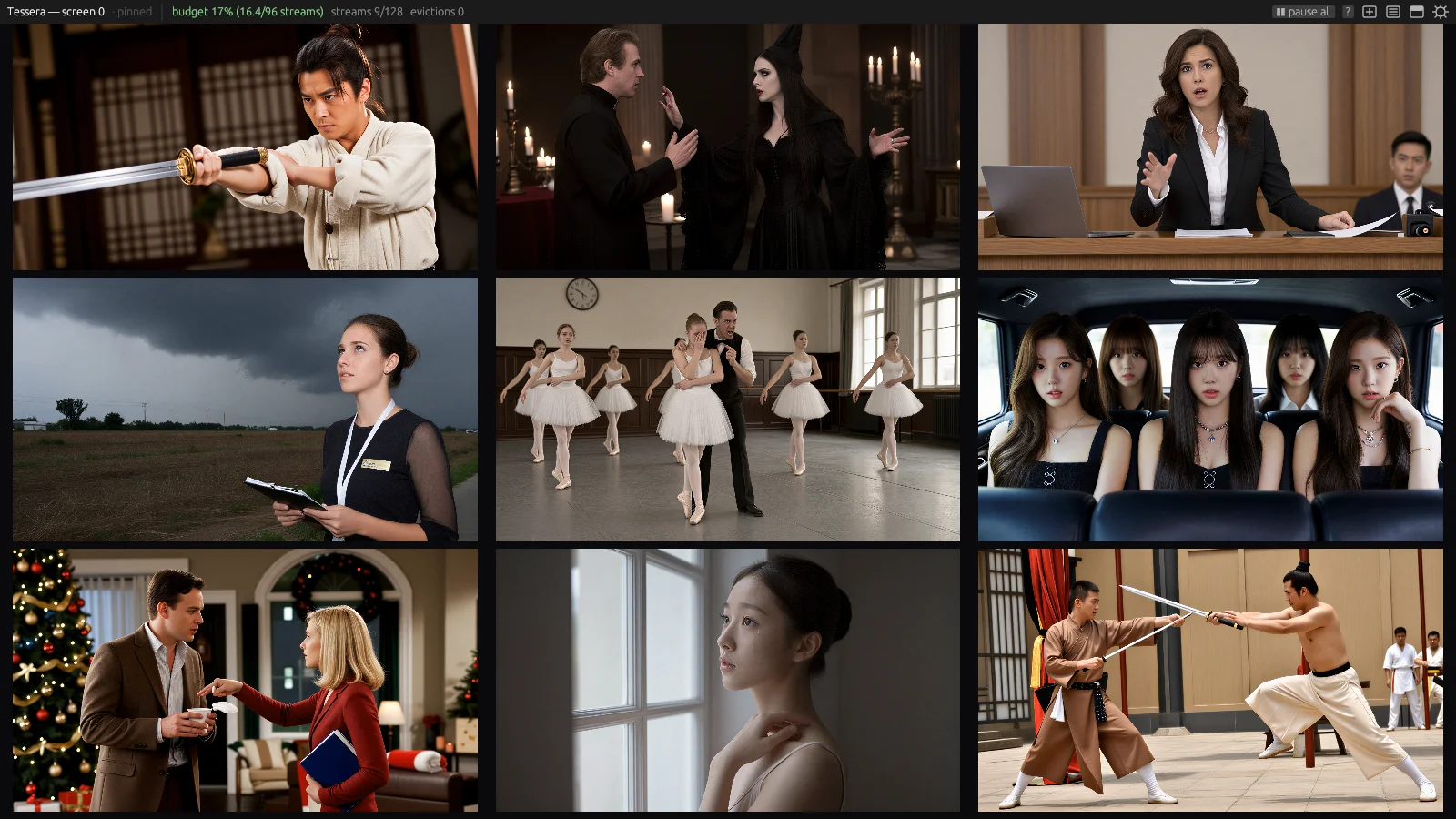
That's where the name comes from: openTessera is the desktop sibling of Tessera, the Quest app, rebuilt from scratch for Linux and macOS. It's free and open source under the GPL, written in Rust on top of libmpv, the engine inside mpv.
Every tile is its own player decoding on the GPU, so a wall is cheap: on an NVIDIA RTX 5080, twelve 4K streams play in real time on about 2.4% of the CPU.
Pin one, keep the rest
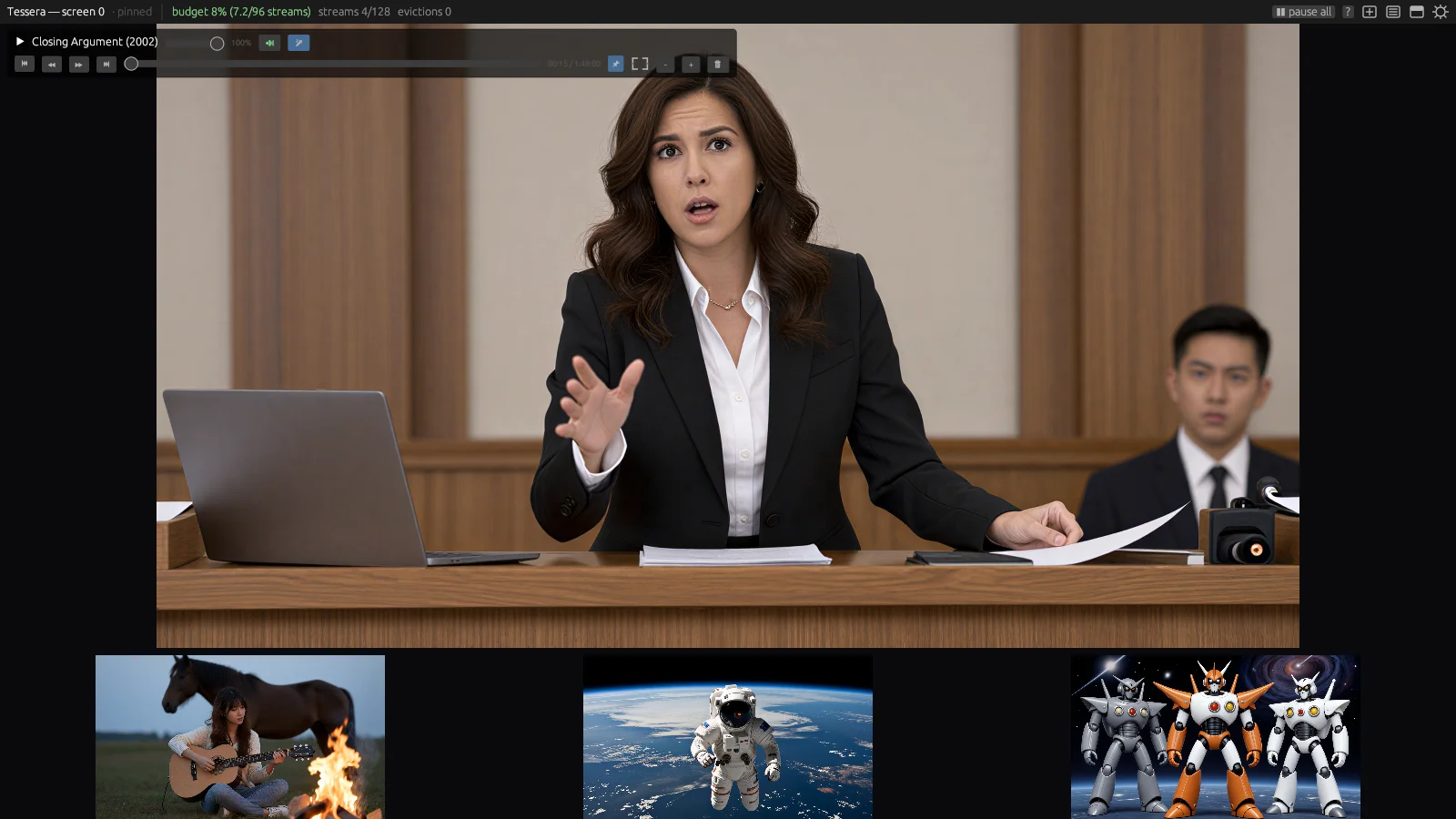
A grid treats every video as equal, and usually one isn't. Press P over a tile — or its pin button — and it takes most of the window while the others shrink into a strip underneath, still playing. You watch one properly and keep an eye on the rest.
- The sound follows the pin. If anything is playing audio, pinning a tile gives it the sound and mutes the others. If everything was muted, it stays muted — pinning is no reason to start making noise. (A setting, on by default.)
- Swap what's featured by dragging a tile from the strip onto the big one. Press P again to go back to the grid.
- F zooms a tile to fill its window outright, for when the strip is a distraction. Sound follows that too.
Windows and walls
- It starts as one ordinary window. Open more whenever you like, and drag a tile from one window to another.
- W turns a window into a fullscreen wall on whatever monitor it's on. Start it with
--maxand it fills every monitor at once. - T floats a window above everything else with no title bar — picture-in-picture for the one thing you want to keep watching while you work.
- The controls shrink with their tile, so a twelve-tile wall isn't buried under buttons, and each monitor remembers its own UI scale.
The decode budget
A GPU can only decode so much at once. openTessera doesn't pretend otherwise: each new stream is admitted against a decode ceiling, weighted by resolution, frame rate and codec. When the wall is full, the oldest stream pauses to make room rather than everything stuttering, and the ceiling lowers itself if decoders start dropping frames.
Where your video lives
Everything feeds one shared queue, and every tile is a slot that plays from it. Build the queue from the library browser, then reorder, shuffle or sort it.
- Folders — local disks, or a network share once it's mounted
- Plex — link through plex.tv with the on-screen code; no token to dig out
- Jellyfin — servers on your network are found for you; sign in once with your username and password, which are swapped for a token and never stored
- http(s) URLs — anything mpv can open
Plex and Jellyfin play the original file through the server's direct-play endpoint. Nothing is transcoded, and seeking works the way it does for a local file.
Security cameras
A camera is a stream URL — RTSP, RTSPS and the like — so it goes in the queue like any film, and a wall of cameras is just a wall. Live streams are played differently from files on purpose: no big read-ahead cache (that's latency, not resilience, on something you can't seek), no looping, nothing to delete.
Ubiquiti cameras are found on your network with a scan. UniFi Protect is tested, with G4 Dome and G6 Turret cameras streaming through the controller. Other brands should work if mpv can open their stream; I haven't been able to test them, so a report from your setup would help.
An assistant can drive it
tessera mcp is an MCP server, so an AI assistant can work the player for you: ask what's playing, pause or seek a tile, change the volume, search a film's subtitles for a line and jump to it, crop the black bars off, or look at the current frame. It talks to the running app over a local socket — no network port, no token — can only open media from your configured folders and ~/Videos, and has no way to delete anything.
Built with AI, and saying so
Most of openTessera's code and documentation were written by Claude, Anthropic's model, working in Claude Code. I directed the design, tested it on real hardware, and decided what shipped. The repository says so too, and its notes and roadmap record why each thing was built the way it was.
Requirements
- Version
- 0.3.0 — an early release, not 1.0
- macOS
- Apple Silicon, macOS 15 or newer. The download includes everything it needs. It isn't signed by Apple yet, so macOS asks you to approve it once — the release notes say how.
- Linux
- Built from source (one command) with your distribution's libmpv. Tested on Pop!_OS (GNOME, X11) with an NVIDIA GPU, and on Ubuntu (COSMIC, Wayland) with Intel graphics. One known issue there: on Wayland, T hides the title bar but doesn't float the window on top. Other distributions and AMD are untested so far.
- Windows
- Not supported, and no plans
- Sources
- Local and mounted folders, Plex, Jellyfin, RTSP/RTSPS cameras, http(s) URLs
- Licence
- GPL-3.0-or-later. Free, no account, no telemetry.
Talk to me
One developer, and I read everything. Tell me what your setup is and how it went — open an issue (the template asks for what helps) or write to hello@rabbitholesolutions.ca.